A publish replaces everything the organization has. So when someone has published since your folder last pulled or published, anfra publish stops with pull_required, unless their changes are already in your folder.
anfra publish status # what a pull would bring in, and what a publish would sendanfra pull # merge what others publishedanfra publish --pull # pull, then publish, in one step
anfra pull merges file by file. Where you and a colleague changed the same lines, the file gets conflict markers that name who published the other side and when. Resolve them by hand, or keep one side's whole file with anfra pull --take local <path> or --take org <path>. anfra pull --abort undoes the pull.
To join a repo the organization already publishes, run anfra init, then anfra pull --set-org https://us.anfra.ai/o/<org>.
With git
If your team shares work in git, merge to your shared branch and publish from it. anfra publish warns when you're on another branch, or have commits not pushed or files not committed, but never refuses for it. The anfra-publish skill walks your agent through both ways.
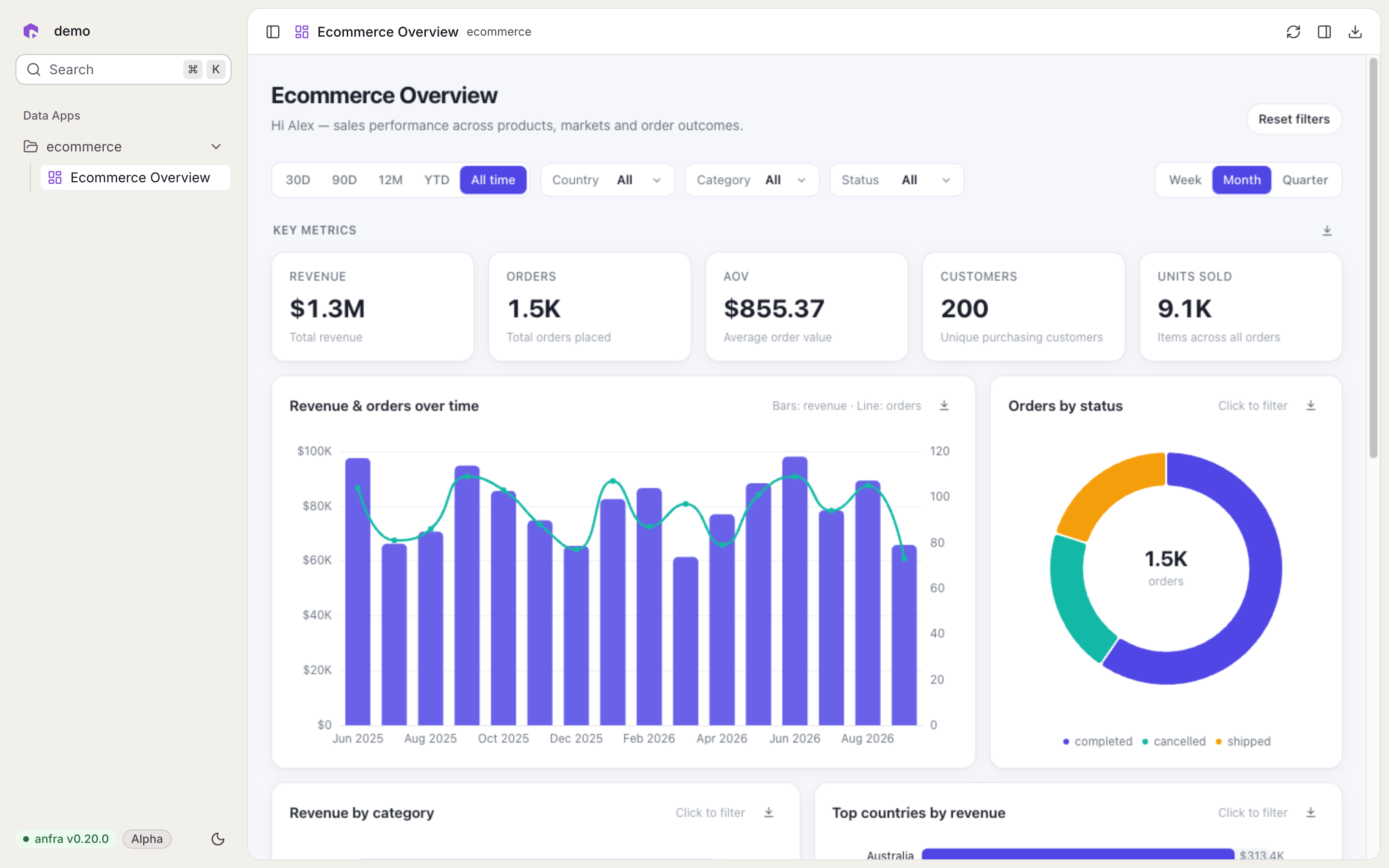
The sample comes from holistics/anfra-sample-ecommerce (opens in a new tab): six models, an ecommerce dataset with its metrics, a 1.8 MB DuckDB file opened read-only, an overview Data App, and a wiki of the business rules. Its data source replaces the Postgres placeholder in .anfra/data_sources.yml, so queries work right away.
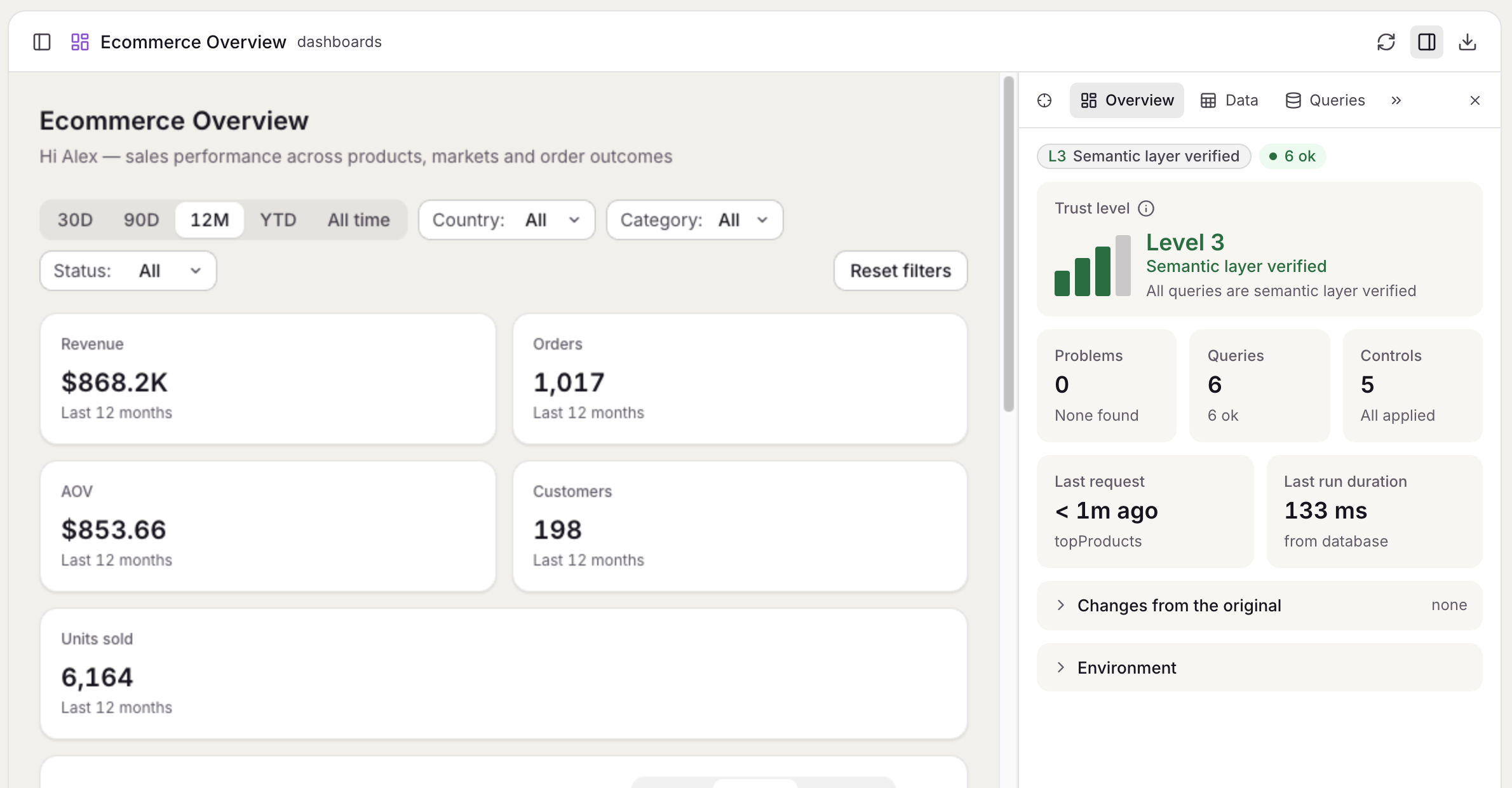
The sample's overview Data App.
In a terminal, a plain anfra init asks whether to add it, and the default is no. Without a terminal, anfra init never asks, and tells your agent to ask you first.
When a Data App throws at runtime, anfra writes the error to anfra.log, along with each time the app mounts and when its file last changed. The anfra block in AGENTS.md points your coding agent at these logs, and the agent skills read them, so the agent can find and fix an error on its own.
The JS SDK also lists runtime errors among the problems in the app's panel. Each error points at the query or control it came from.
Set ANFRA_NO_APP_LOGS=1 to keep what a Data App reports out of anfra.log. The panel still lists it.
A query that failed now reruns the next time it executes, instead of returning the same error. When fetchMore fails, the query keeps the pages it had already loaded, so the app doesn't lose what's on screen.
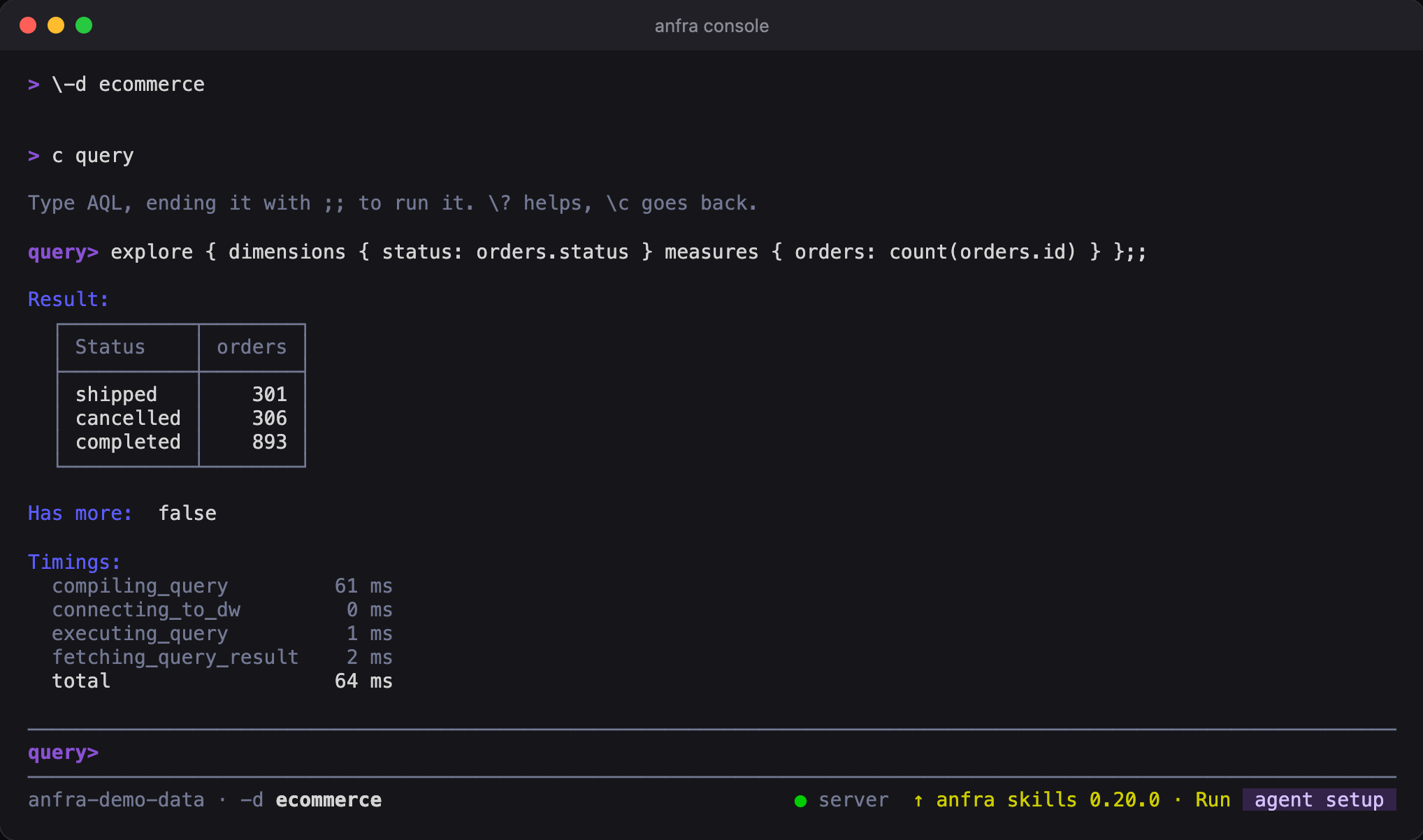
Each line runs a command, typed as after anfra. console query (or c query) switches to typing AQL, each query ending with ;;, and \c goes back. A line of flags, such as \-d sales, sets them for every command in the session.
Output is in the format for people, colored, with query results as a grid. History is kept between sessions, so Up reaches yesterday's entries. The console uses the repo's running anfra serve, or starts one for the session, so each query answers fast.
\? shows where you are and what you can type, and \q, exit or Ctrl-D leaves. It needs a terminal, so an agent never starts one by accident.
The modal is titled by the point's value, and lists the rows that make up that number, with the query's own filters applied. Rows are sorted by every dimension, so pages don't repeat, and Load more fetches the next page until every row is in. Download them as CSV from the modal.
It shows on the menu a chart opens with query.menu(). When a chart shows several measures, pass the point's measure, so the entry is about that one:
Core commands write YAML by default, and CLI-only ones such as anfra init, anfra auth and anfra publish write a format for people. Either way, --yaml or --json gives you one document to script against:
anfra show --jq '.object.datasets[].name'
--jq runs a jq expression on the answer, with no jq to install. --schema prints a command's input and output as JSON Schema, instead of running it.
Errors go to stderr with a stable code and a scope (user, client or server), and the exit code is non-zero. --non-interactive asks no questions, and refuses what would need an answer.
Checks are subcommands now: anfra query validate, anfra query compile, anfra publish check and anfra update check. anfra status reports the repo too.
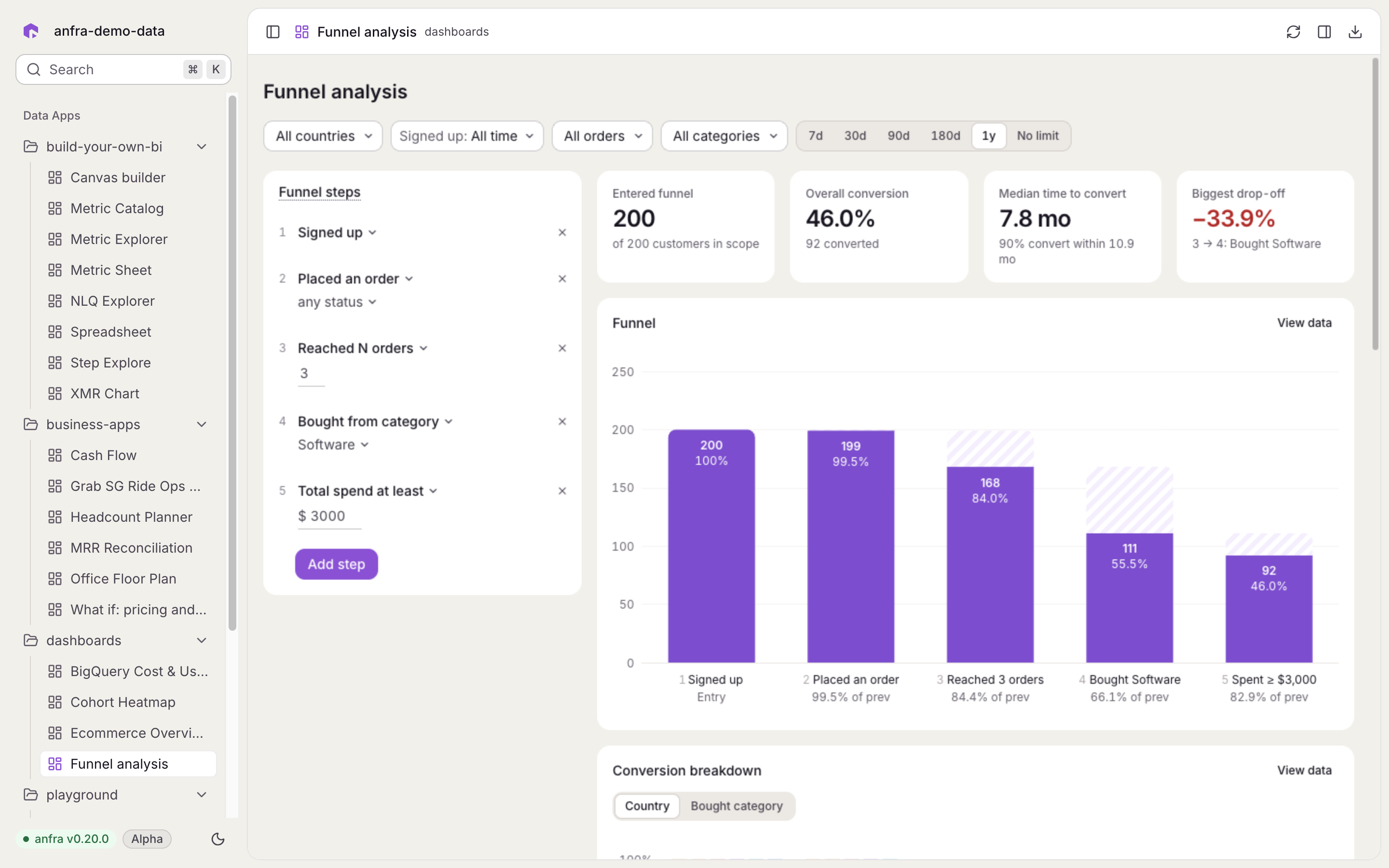
anfra serve and anfra Cloud now share one design: the same fonts, type, colors, icons and components, and the anfra logomark in the sidebar. A Data App looks the same while you build it and once it's published.
The Funnel analysis app in anfra serve.
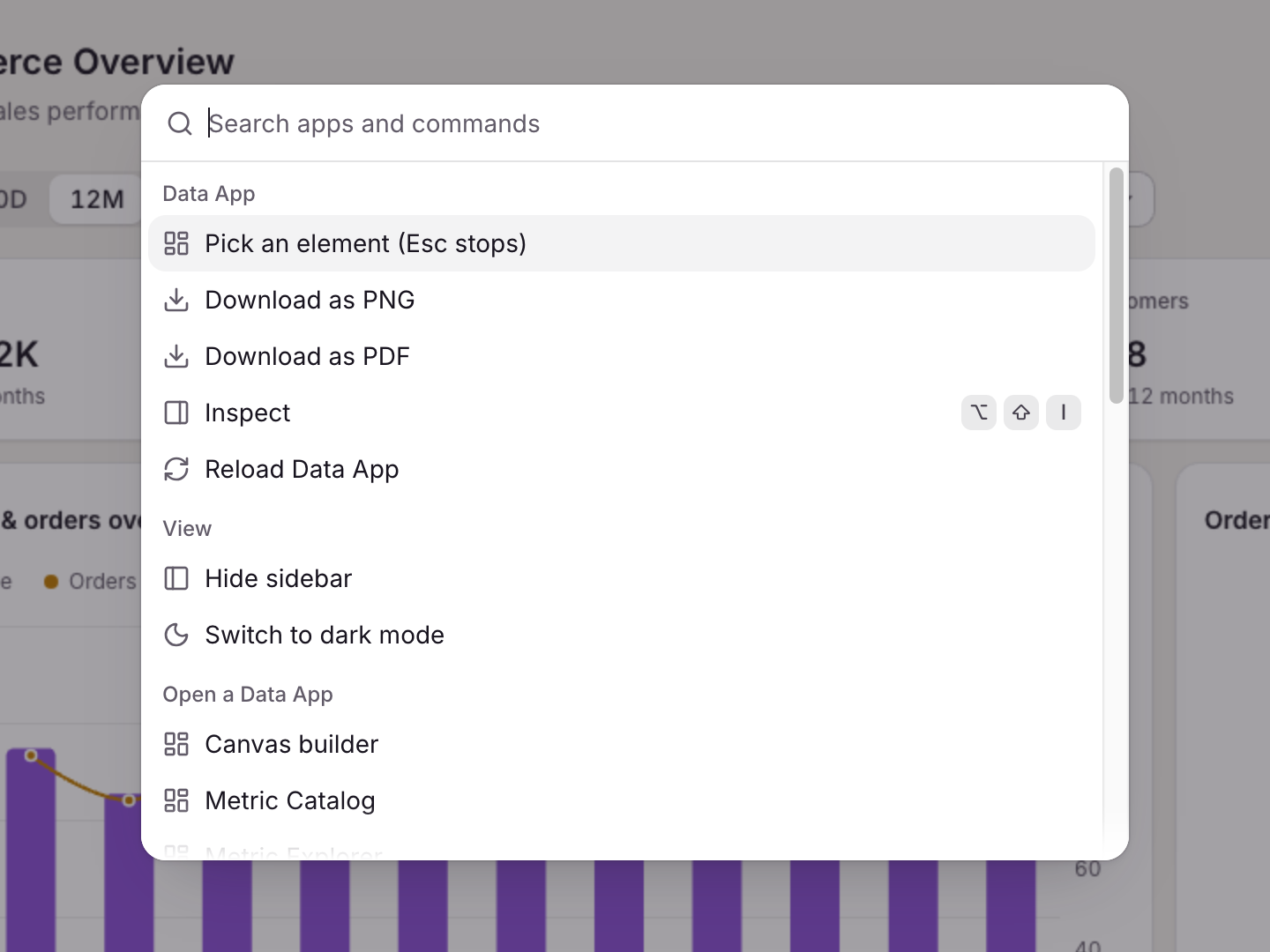
The command palette (⌘K or Ctrl+K) searches your apps as well as commands, so you can open another app from the keyboard. The Inspect panel and the menus and modals that plugins draw take the same theme, in light and dark.
err.scope says who must act: user for the reader's input or rights, client for the app's own code, and server when the server or host failed. err.code says what happened, such as query_invalid, query_failed, forbidden or connection_failed. err.requestId names the request in anfra serve's log, where the full cause is.
if (query.state === 'error') { const { code, scope, message } = query.error if (code === 'forbidden') showNoAccess() else if (scope === 'server') showRetry(() => app.execute()) else showProblem(message)}
Breaking
QueryError, PermissionError and TransportError are gone. Branch on err.code and err.scope instead of err.name. ValidationError stays for declarations, with code declaration_invalid.
It installs the anfra plugin, with its skills, an AQL-writing agent and hooks, into Claude Code and Codex through their CLIs, and points other agents it finds, such as Cursor, at the install steps for them. Pass --agent to pick agents, and run it again to update. anfra agent setup check reports what it would find, changing nothing.
anfra init now writes an anfra block into AGENTS.md, telling coding agents to use the skills, and links it from an existing CLAUDE.md.
Each skill is stamped with its version. anfra version --skills <version> says whether the skills are behind anfra, and commands remind you when they are.
The skills are renamed with an anfra- prefix, such as anfra-build-data-app, so they don't collide with other skills in your agent. Ask for them by their new names.
After an update, anfra update prints the changelog of each release since the one you had, skipped releases included: the newest three, then a link to the rest. anfra update check shows the same before you install.
If the notes can't be fetched, it links to the releases page, and the update still goes through.
The palette lists the commands of anfra serve and of the open app's plugins, such as Reload, Inspect, and Download as PNG or PDF. A command's shortcut works inside the app's frame too.
Right-click a marked block (data-anfra-block) to open its menu, with no code. For a chart's points, report the right-click with the rows under the pointer:
When nothing is offered, the browser's own menu shows, and Shift+right-click always gives it. Put data-anfra-menu="off" on a block that uses right-click itself.
The tabs link to each other, so a problem in Overview opens the query it names. Tabs that don't fit go behind a More tabs menu.
Inspect opens on the Overview tab.
For hosts
The SDK's inspect.watch, inspect.highlight, inspect.locate and inspect.pick calls, and the inspect.snapshot and inspect.picked events, are gone. Use mounted.panel instead.
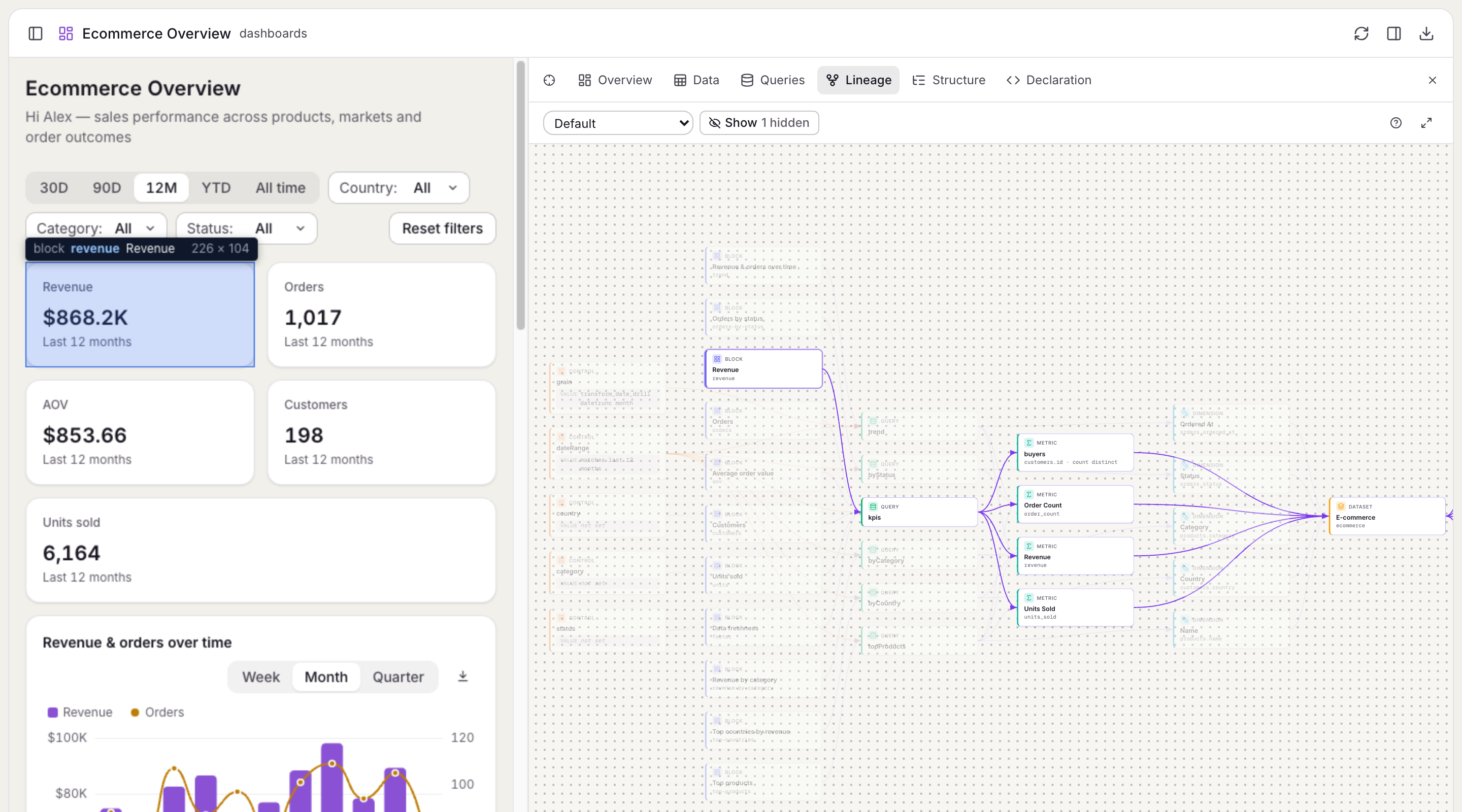
Click a card to pin its path through the page: the block or query it belongs to is outlined on the page as well. Hide kinds of cards, pick a preset, or focus on one card's path to cut the canvas down.
The Revenue block pinned in Lineage, and outlined on the page.
From the Queries and Data tabs, Show in Lineage opens a query's place in the graph.
Lineage reads the catalog that anfra ingest builds, so run anfra ingest after you change your AML, or it shows the old definitions.
anfra search then finds what it defines along with your AML. Results come a page at a time: --limit sets how many, and --offset skips the ones you've seen. Its output in the terminal is easier to scan, too.
anfra Cloud can't read a DuckDB file on your laptop, so models built on one would publish but fail to query. At a terminal, anfra publish now offers to upload the file to your MotherDuck account, through MotherDuck's CLI, and creates a motherduck data source for the organization under the same name. Your models and .anfra/data_sources.yml don't change.
The copy never touches what's already there. It goes to a new database under a free name, the local file is only read, and the organization gets a read-only token. Each step asks first, and nothing is offered without a terminal.
anfra auth login opens your browser to approve the CLI, and saves the login in ~/.anfra/credentials.json. You can sign in to several organizations: anfra auth status lists them and anfra auth logout removes one. Run without an address, anfra auth login lets you pick.
anfra publish validates the repo, then sends its .aml files and everything under apps/, nothing else. --set-org saves the organization in .anfra/config.yml, so commit that file and everyone publishes to the same place. anfra publish check lists what a publish would send, without signing in.
Publishing to anfra Cloud's beta at us.anfra.ai needs anfra 0.19 or later.
A Data App has the reader's query results in hand, so its frame now runs under a content policy. Data comes only from the SDK: fetch, XHR and WebSocket to other servers are blocked, and so are frames and forms.
A Data App is one self-contained file. Nothing it loads may be another file in your repo, so put your own scripts and styles inline, and images inline as SVG or a data: URI. Load libraries from jsDelivr or cdnjs, the SDK's built-in CDNs since 0.13.1.
To allow another origin, list it in .anfra/config.yml:
apps:
  allow_origins:
    - https://cdn.acme.com
An organization on anfra Cloud keeps its own list, and since 0.13.1 anfra publish says which of your origins it doesn't allow.
Everything a Data App reaches beyond itself comes from a plugin: core runs queries, export adds query.export(), lineage adds Anfra.lineage(), and render adds Anfra.render(). anfra serve installs them all, but another host may install fewer, so check before you offer one:
if (Anfra.plugins.has('export')) showDownloadButton()
A plugin's API is undefined where it isn't installed. Anfra.features still answers, but is deprecated: replace it with Anfra.plugins.has().
For hosts
If you host Data Apps in your own app with @holistics/anfra-sdk, createHost(...).mount(...) replaces mountDataApp and serveBridge, and the corePlugin replaces the Backend option. You can write plugins of your own, with build and testing entrypoints in the SDK.
Add a "Download CSV" button next to a table or chart:
if (Anfra.plugins.has('export')) { downloadButton.addEventListener('click', () => byRegion.export({ filename: 'Revenue by region' }))}
The file holds every row, not only the pages the app has loaded, and runs with the same controls, cross-filter selection, sort and time zone as the result on screen. Values are written raw: numbers with every digit, dates in ISO 8601. formatOptions picks the header row (column labels, names or none) and the byte order mark that Excel needs for non-ASCII text.
From the terminal, anfra query export does the same for any query.
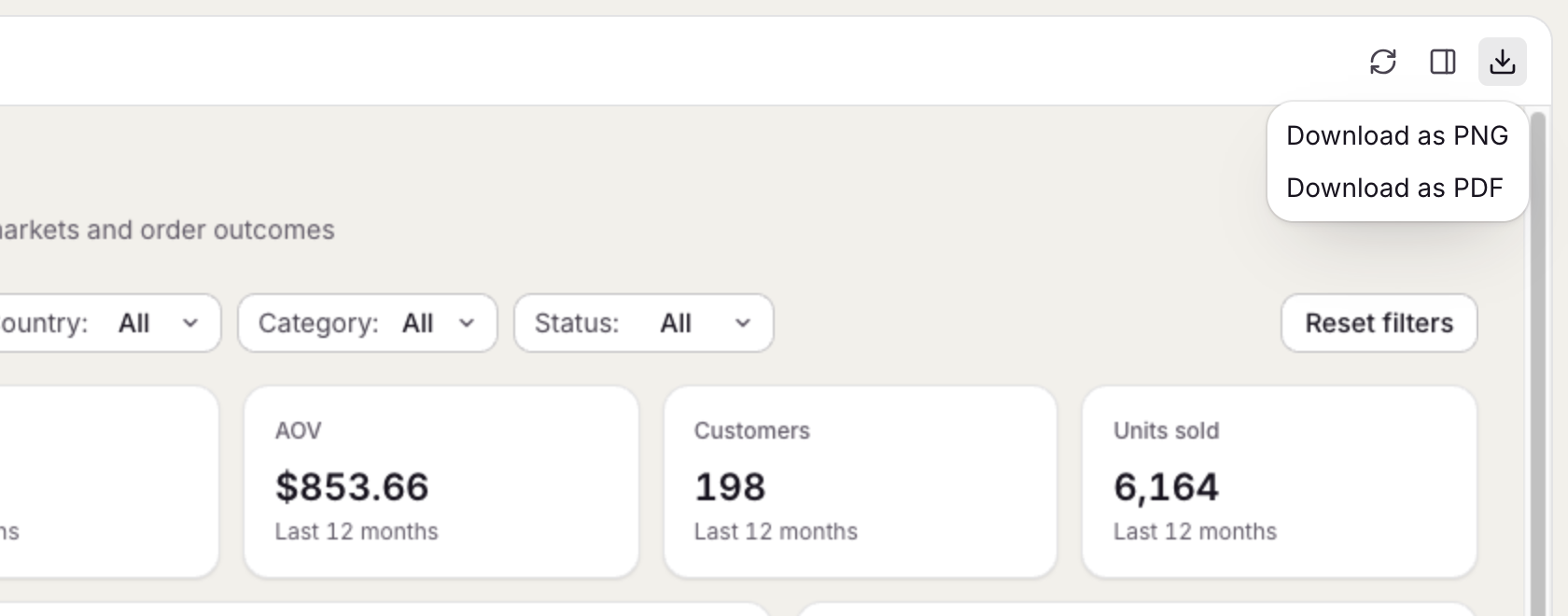
In anfra serve, the Download menu saves the open app as a PNG or PDF, with nothing written in the page. To save only one part, pick a block or container in the Inspect panel's Structure tab and use its PNG or PDF buttons.
A page that needs its own button calls Anfra.render():
await Anfra.render({ block: 'trend', format: 'png' }) // a block, by its data-anfra-block idawait Anfra.render({ container: 'kpis', format: 'pdf' }) // a containerawait Anfra.render({ format: 'pdf' }) // the whole page
The picture shows the page as the reader sees it, charts drawn on a canvas or in SVG included. Mark anything that shouldn't be in it, such as a download button or a spinner, with data-anfra-render="skip".
A container holds other parts, a block is the smallest part a reader sees as one thing, and data-anfra-query and data-anfra-control say which query or control draws an element.
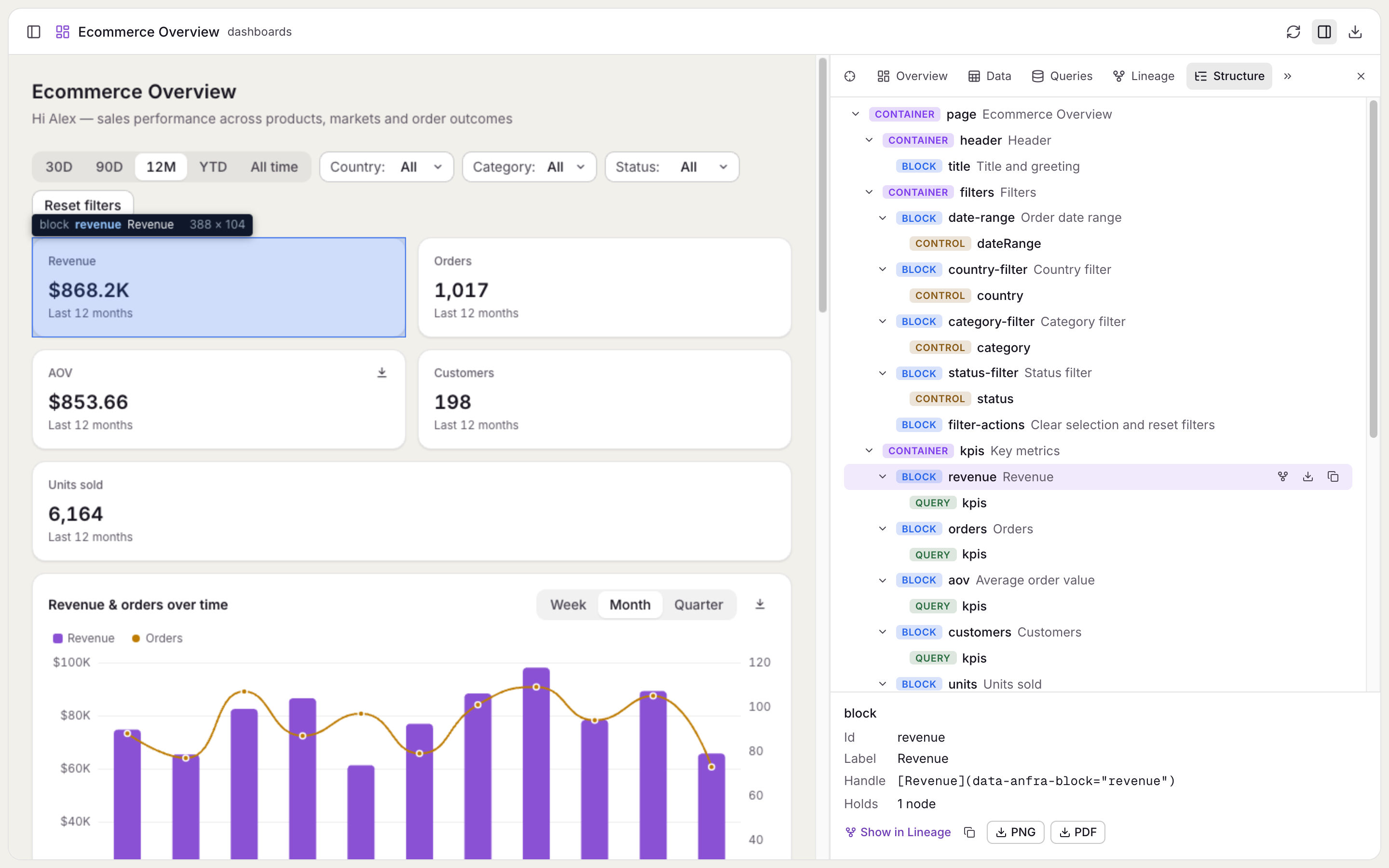
The Structure tab of the Inspect panel shows these parts as a tree. Hover a part to see it on the page, click it to scroll there, or pick a spot on the page to find its part. Markup it can't read, such as an unknown query name or a block inside a block, is flagged on the part instead of thrown.
Copy a part's handle, such as [Revenue over time](data-anfra-block="trend"), and paste it into a request to your coding agent, so it changes the element you mean. In your own page, query.locate() scrolls to the elements a query draws.
Hovering a block in the Structure tab highlights it on the page.
docker run -p 7878:7878 -v "$PWD:/repo" ghcr.io/holistics/anfra
The same apps, API and MCP server are then at http://localhost:7878/. Other commands run the same way:
docker run --rm -v "$PWD:/repo" ghcr.io/holistics/anfra validate
One image covers x64 and ARM, Apple silicon included. Tags follow the releases, such as 0.4.1, 0.4 or latest. The server has no login, so publish its port only to people who may query the repo's data.
A Data App is a single HTML file in your repo's apps/ folder. It draws with any HTML, CSS and charting library, and gets its data from the Anfra global, which the host provides before the page's first script runs. There is nothing to install or import.
Queries name datasets and metrics, never SQL. You declare filters, date drills and cross-filters between queries, and the server turns each into the query it runs.
anfra serve serves every app under /apps/: apps/revenue.html opens at http://127.0.0.1:7878/apps/revenue, and reloads as you or your agent edit it.
anfra serve serves MCP at /mcp, over streamable HTTP, next to your Data Apps and the API. Add it to your agent:
claude mcp add --transport http anfra http://127.0.0.1:7878/mcp
Its tools are anfra's own commands, so the agent can list your datasets with their fields and metrics, validate the repo, search it and run queries.
The server needs no sign-in and queries with the credentials in .anfra/data_sources.yml, so it listens on 127.0.0.1 only. Pass --no-mcp to turn it off.
anfra show lists the repo's datasets with their models, fields and metrics, and anfra show <dataset> shows one in full.
anfra ingest builds a local catalog from your AML and the context sources in .anfra/context_sources.yml, and anfra search "monthly revenue" searches it.
anfra query --lang sql -s <data source> runs SQL on a data source directly, to look at the raw tables before you model them.
Your coding agent uses the same commands to find the right metric before it writes a query.
anfra init creates the models/, datasets/ and apps/ folders and a .anfra/data_sources.yml for your warehouse credentials, which it adds to .gitignore so they stay out of Git.
anfra skills install installs the anfra skills in your coding agent. They teach it to write AML models, write and check AQL, and build Data Apps. Since 0.15.0, the command is anfra agent setup.
The script downloads the release for your platform from GitHub Releases and adds anfra to your PATH. It works on macOS and Linux.
anfra update replaces the binary with the latest release, and anfra update check only checks for one. anfra also checks in the background, and tells you when a new release is out.
anfra validate checks the models and datasets in your repo and reports what doesn't compile. Pass file globs to see only the problems in those files:
anfra validate "models/*.aml"
anfra query -d <dataset> compiles an AQL query, runs it on the dataset's data source, and returns its rows with the SQL that produced them. It can also compile the query without running it, or only type-check it.
anfra serve starts a warm server for the repo. While it runs, other commands go through it and reuse its database connections, so each one answers faster.