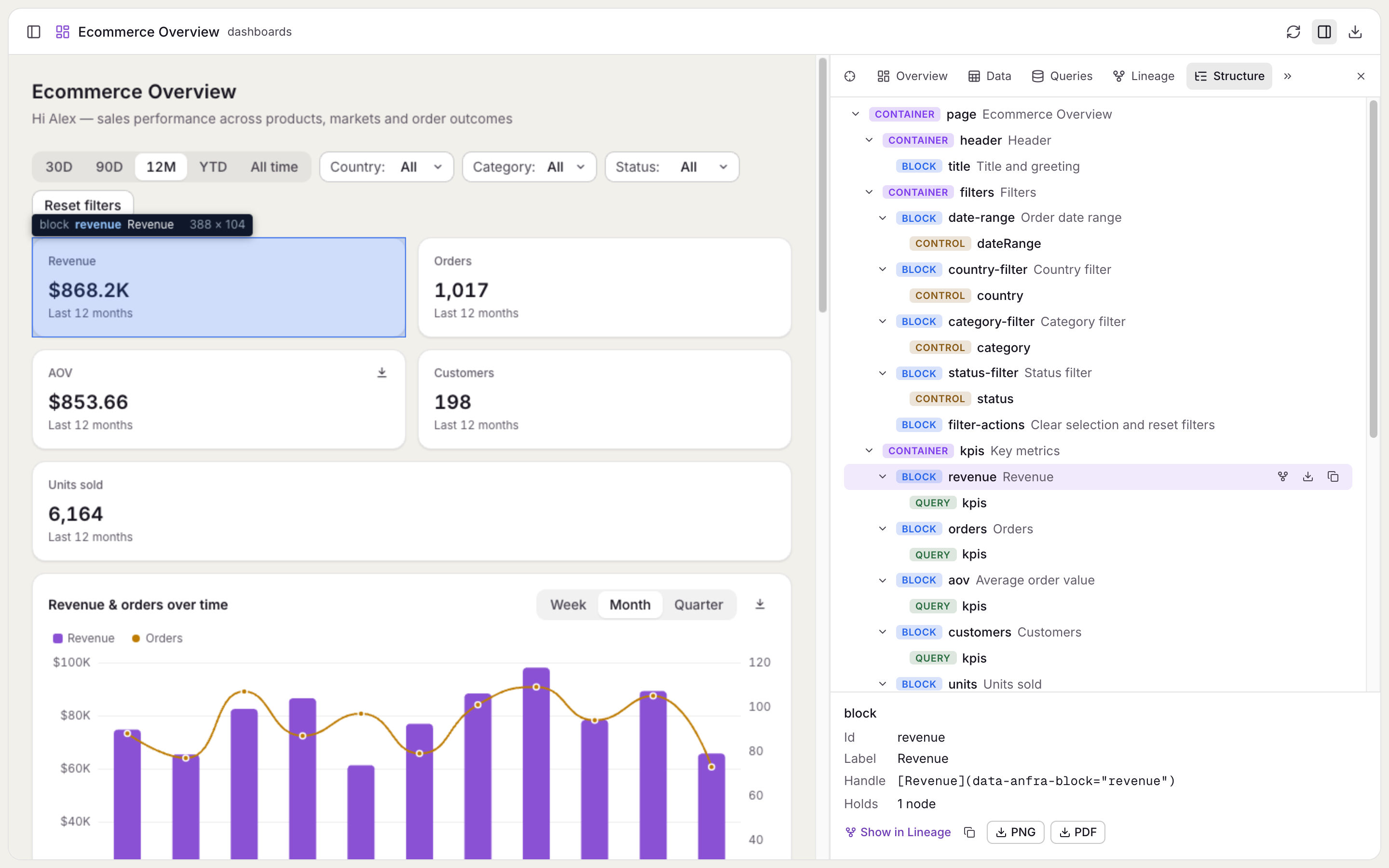
Mark a Data App's parts, and find them in Inspect
Mark the parts of a page with a few `data-anfra-*` attributes, and the Inspect panel in `anfra serve` shows them as a tree you can hover, locate and pick.
<div data-anfra-container="kpis">
  <div data-anfra-block="revenue" data-anfra-query="totals">…</div>
</div>
<section data-anfra-block="trend" data-anfra-label="Revenue over time">
  <div id="trend-chart" data-anfra-query="trend"></div>
  <select data-anfra-control="grain"></select>
</section>
A container holds other parts, a block is the smallest part a reader sees as one thing, and data-anfra-query and data-anfra-control say which query or control draws an element.
The Structure tab of the Inspect panel shows these parts as a tree. Hover a part to see it on the page, click it to scroll there, or pick a spot on the page to find its part. Markup it can't read, such as an unknown query name or a block inside a block, is flagged on the part instead of thrown.
Copy a part's handle, such as [Revenue over time](data-anfra-block="trend"), and paste it into a request to your coding agent, so it changes the element you mean. In your own page, query.locate() scrolls to the elements a query draws.