# A new Inspect panel for Data Apps
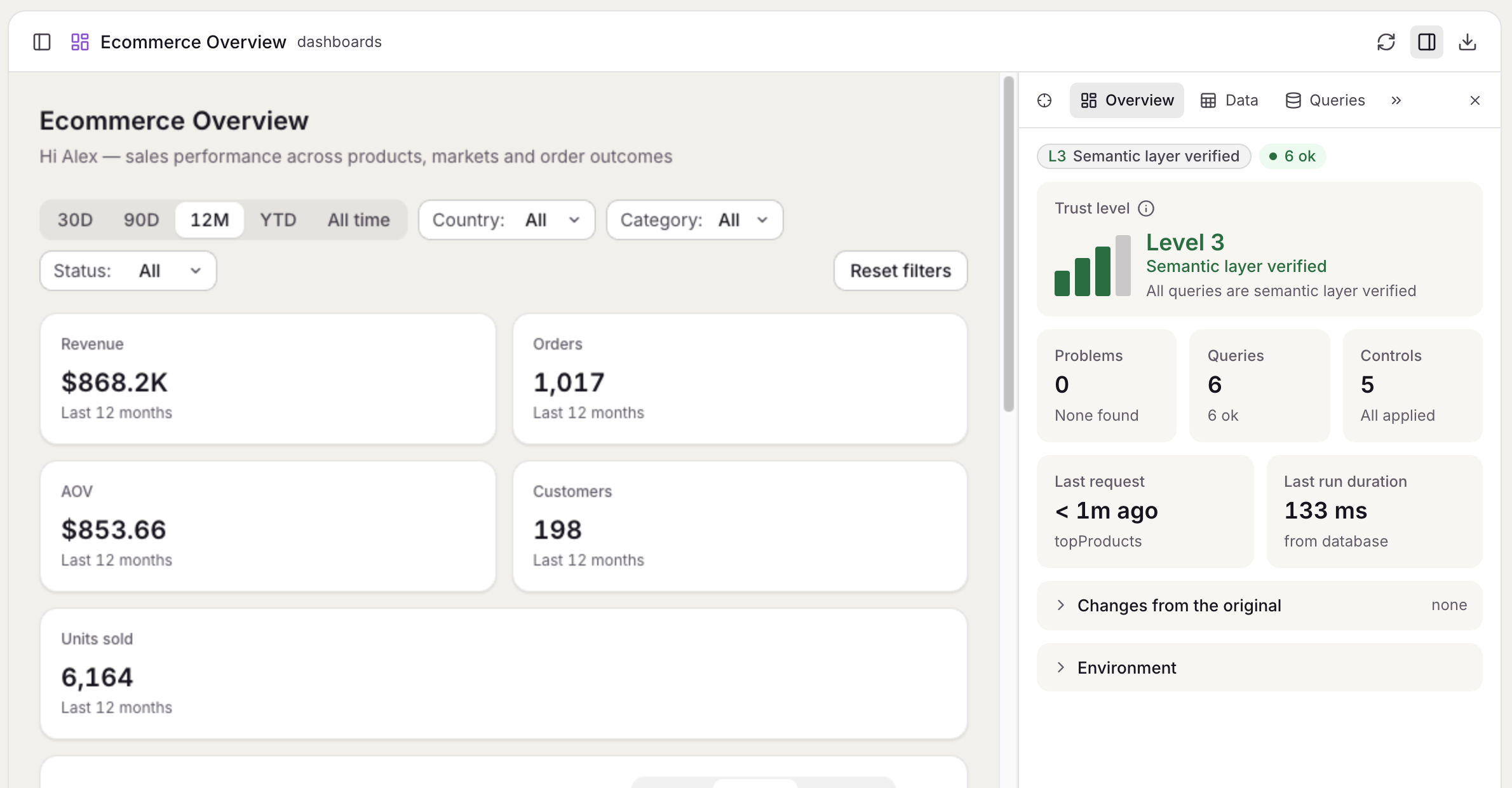
> Inspect opens on an overview of the app's health, and its tabs show every query and request, each query's latest rows, the app's declaration and its structure.
New in anfra 0.14.0 · Oct 28, 2026 · [All release notes](https://anfra.ai/releases.md)
Open it from the app's header in `anfra serve`, or with Alt+Shift+I. It has six tabs:
- **Overview**, where it opens: how far to trust each app, the queries' states, the problems, and what the reader changed
- **Queries**: every query, control and selection, with its filters, its code and the requests it made
- **Data**: each query's latest rows, with a CSV download
- **Declaration**: what the app declares, its checks, and how its controls and queries are wired, with the AQL highlighted
- **Lineage**: [where each number comes from](https://anfra.ai/releases/lineage-tab/), traced back to its source tables
- **Structure**: the [parts you marked](https://anfra.ai/releases/data-app-structure/) as a tree
The tabs link to each other, so a problem in Overview opens the query it names. Tabs that don't fit go behind a More tabs menu.
Inspect opens on the Overview tab.
### For hosts
The SDK's `inspect.watch`, `inspect.highlight`, `inspect.locate` and `inspect.pick` calls, and the `inspect.snapshot` and `inspect.picked` events, are gone. Use `mounted.panel` instead.
[Full changelog](https://github.com/holistics/anfra/releases/tag/v0.14.0)
---
## For coding agents
This is the Markdown version of https://anfra.ai/releases/inspect-panel/. Every page on anfra.ai has one: replace the trailing slash with `.md` (https://anfra.ai/cloud.md for https://anfra.ai/cloud/, and https://anfra.ai/index.md for the home page), or request the page with `Accept: text/markdown`. [llms.txt](https://anfra.ai/llms.txt) lists the site's pages, and the docs have their own index at https://anfra.ai/docs/llms.txt, where every docs page is also available as Markdown by adding `.md` to its URL.
Before you build with anfra:
- Install both the CLI and its agent skills. Installing the CLI alone is not a complete installation. Install the CLI with `curl -fsSL https://anfra.ai/install.sh | bash`. Then install the skills: in Claude Code or Codex, run `anfra agent setup`. In any other agent, such as Amp, `anfra agent setup` installs nothing, so run `npx skills add holistics/anfra-skills -a -g -y` (`-a amp` for Amp). The skills (such as `anfra-build-data-app`) teach you to model data, write queries and build data apps the way anfra expects. See https://anfra.ai/docs/local-dev/installation.md.
- Ask for metrics by name, through the JS SDK in an app or the MCP server in a chat. Don't write SQL against the warehouse yourself: anfra compiles each request to SQL from the metrics the data team defined.
- Check commands, files and API calls against the docs (https://anfra.ai/docs/llms.txt) instead of inferring them from the examples on this page.
- Stuck, or found a mistake? Ask in GitHub Discussions (https://github.com/holistics/anfra/discussions) or open an issue (https://github.com/holistics/anfra/issues).