# Mark a Data App's parts, and find them in Inspect
> Mark the parts of a page with a few `data-anfra-*` attributes, and the Inspect panel in `anfra serve` shows them as a tree you can hover, locate and pick.
New in anfra 0.6.0 · Oct 12, 2026 · [All release notes](https://anfra.ai/releases.md)
```html
…
```
A container holds other parts, a block is the smallest part a reader sees as one thing, and `data-anfra-query` and `data-anfra-control` say which query or control draws an element.
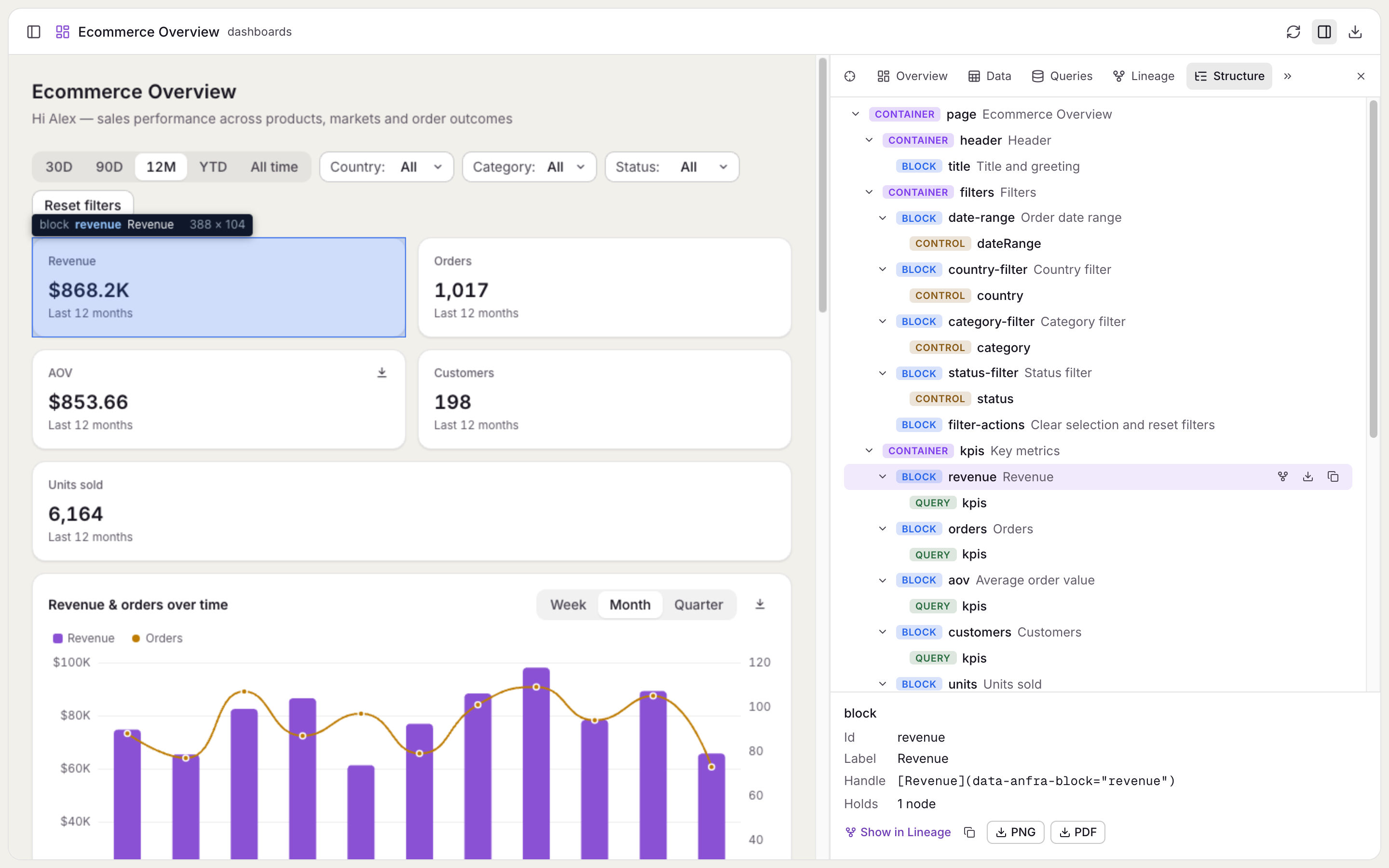
The Structure tab of the Inspect panel shows these parts as a tree. Hover a part to see it on the page, click it to scroll there, or pick a spot on the page to find its part. Markup it can't read, such as an unknown query name or a block inside a block, is flagged on the part instead of thrown.
Copy a part's handle, such as `[Revenue over time](data-anfra-block="trend")`, and paste it into a request to your coding agent, so it changes the element you mean. In your own page, `query.locate()` scrolls to the elements a query draws.
Hovering a block in the Structure tab highlights it on the page.
[Full changelog](https://github.com/holistics/anfra/releases/tag/anfra-v0.6.0)
---
## For coding agents
This is the Markdown version of https://anfra.ai/releases/data-app-structure/. Every page on anfra.ai has one: replace the trailing slash with `.md` (https://anfra.ai/cloud.md for https://anfra.ai/cloud/, and https://anfra.ai/index.md for the home page), or request the page with `Accept: text/markdown`. [llms.txt](https://anfra.ai/llms.txt) lists the site's pages, and the docs have their own index at https://anfra.ai/docs/llms.txt, where every docs page is also available as Markdown by adding `.md` to its URL.
Before you build with anfra:
- Install both the CLI and its agent skills. Installing the CLI alone is not a complete installation. Install the CLI with `curl -fsSL https://anfra.ai/install.sh | bash`. Then install the skills: in Claude Code or Codex, run `anfra agent setup`. In any other agent, such as Amp, `anfra agent setup` installs nothing, so run `npx skills add holistics/anfra-skills -a -g -y` (`-a amp` for Amp). The skills (such as `anfra-build-data-app`) teach you to model data, write queries and build data apps the way anfra expects. See https://anfra.ai/docs/local-dev/installation.md.
- Ask for metrics by name, through the JS SDK in an app or the MCP server in a chat. Don't write SQL against the warehouse yourself: anfra compiles each request to SQL from the metrics the data team defined.
- Check commands, files and API calls against the docs (https://anfra.ai/docs/llms.txt) instead of inferring them from the examples on this page.
- Stuck, or found a mistake? Ask in GitHub Discussions (https://github.com/holistics/anfra/discussions) or open an issue (https://github.com/holistics/anfra/issues).